Rescale Desktop: Move Files, Follow Jobs, and Work with Edison from Your Computer
Rescale Desktop is now available. It's an app for your own computer that connects to your Rescale platform. You can upload and download files and folders, check on your jobs, and chat with Rescale Edison, the same assistant you use on the platform, all without opening a browser. It runs on macOS, Windows, and Linux, and it keeps itself up to date.
Release Highlights
What is it?
A desktop app that connects to your Rescale platform with your API key. It brings the following to your computer:
- Move files in both directions: Upload files and folders from your computer or a network drive, and download job outputs and library files. Every transfer shows its progress in one list, where you can cancel it or try again.
- Follow your jobs: See which jobs are running and which have finished, and open any of them on the platform.
- Work with Edison: Ask about your jobs, your software, and how to set up a run. Attach files from your computer, or ask Edison to find a file in a folder you've allowed and upload it for you. Edison asks before every transfer.
- You choose what Edison can reach: Edison works only in folders you allow. It can find files by name and check their size and date. It doesn't read what's inside them.
- Updates itself: The app downloads new versions in the background and asks you to restart when one is ready.
Supported systems: macOS on Apple silicon, Windows x64, and Linux x64.
Why did we build it?
Built for engineers that spend most of their time on their local machine. Their files live on their own computers and network drives. Rescale Desktop gives them one place on that computer to move files, check on their jobs, and ask Edison for help.
How is it used?
Simulation engineers upload input files and pull results back without going through the browser. See jobs and ask Edison questions without signing in to the web platform.
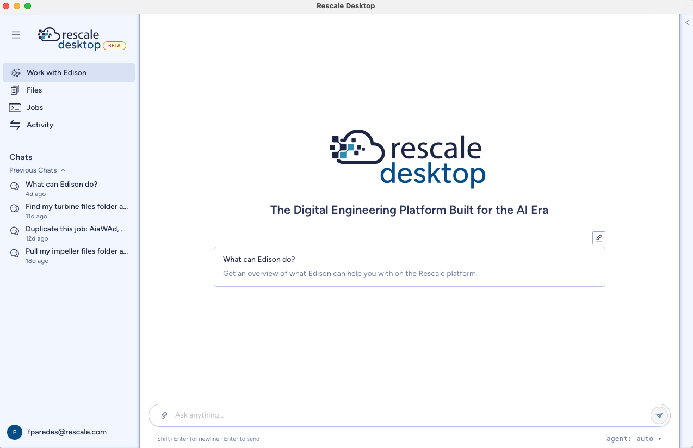
Rescale Desktop, with a new chat with Edison open and your recent chats in the left rail.
Getting Started
- Sign in to your Rescale platform and open Preferences > API.
- In the Rescale Desktop section, download the app for your computer's operating system and install it.
- Open Rescale Desktop, choose your platform, and paste a Rescale API key. If you don't have one, create it on the same page.
- Optional: allow a folder so Edison can find files in it.
Chat with Edison needs Advanced Modeling & Simulation or Agentic Engineering on your workspace. It isn't available on Rescale ITAR yet. On HPC Foundations, you can still use the app to move files and follow your jobs. To change your workspace's plan, contact your workspace administrator or your Rescale account team.
For complete documentation, see Rescale Desktop app.